
12 Data Annotation Tools: Tasks, Editions and Workflows
Last updated:

Data annotation tools help teams create, review, and export labels, but the right choice depends on more than an impressive feature list. A video project may need reliable tracking, an audio project needs usable timestamps, and a distributed team needs controlled review. This comparison explains where 12 platforms fit, which edition distinctions matter, and what to test before choosing software for your actual workflow rather than a polished demonstration.
Research reviewed September 29, 2026. This comparison of data annotation tools is based on documentation, not hands-on performance rankings. Task-fit recommendations and trial checks are our editorial assessment. Product capabilities and plan distinctions come from the linked official sources; confirm contractual availability before purchasing.
Data Annotation Tools Compared at a Glance
To shortlist data annotation tools, start with the output and operating requirements. The table identifies useful starting points, not exclusive capabilities or an overall winner. “Edition” means a product version or subscription tier; deployment describes where it runs. An open-source edition, a free hosted plan, and a commercial self-hosted installation are different choices.
| Tool | Useful Starting Point | Edition or Purchasing Distinction |
|---|---|---|
| CVAT | Visual annotation, video tracking, and 3D datasets | Community self-hosted; Online hosted; Enterprise self-hosted with additional capabilities |
| Label Studio | Configurable text, audio, image, and evaluation tasks | Community, Starter Cloud, and Enterprise have different review and governance features |
| Labelbox | Multimodal annotation and generated-response evaluation | Confirm current editor access and commercial package; do not assume legacy plans apply |
| SuperAnnotate | Custom multimodal forms and structured team workflows | Starter, Pro, and Enterprise differ in orchestration allowances and support |
| Dataloop | Annotation embedded in automated data pipelines | Confirm the commercial scope for annotation, pipelines, integrations, and compute |
| V7 Darwin | Image/video annotation and multi-file visual context | Custom pricing combines platform, users, and data processing |
| Labellerr | Model-assisted labeling with configurable deployment | Researcher, Pro, and Enterprise; private cloud/on-premise is an Enterprise add-on |
| Appen ADAP | Annotation coordinated with internal and external contributors | Confirm platform access separately from workforce and managed-service scope |
| Supervisely | Computer vision annotation linked to model experimentation | Community, Pro, and Enterprise; advanced modality features may require add-ons |
| Encord | Video-native labeling and multi-stage review | Starter, Team, and Enterprise; private deployment belongs in Enterprise discussions |
| Kili Technology | Task allocation, document/text work, and staged validation | Free Trial, Grow, and Enterprise on its pricing page; on-premise is Enterprise-only |
| Segments.ai | Image/point-cloud sequences and sensor fusion | Core, Fusion, and Enterprise; sensor-fusion interfaces are a Fusion distinction |
12 Data Annotation Tools: Where They Fit and What to Verify
1. CVAT: Visual Annotation With a Self-Hosted Option
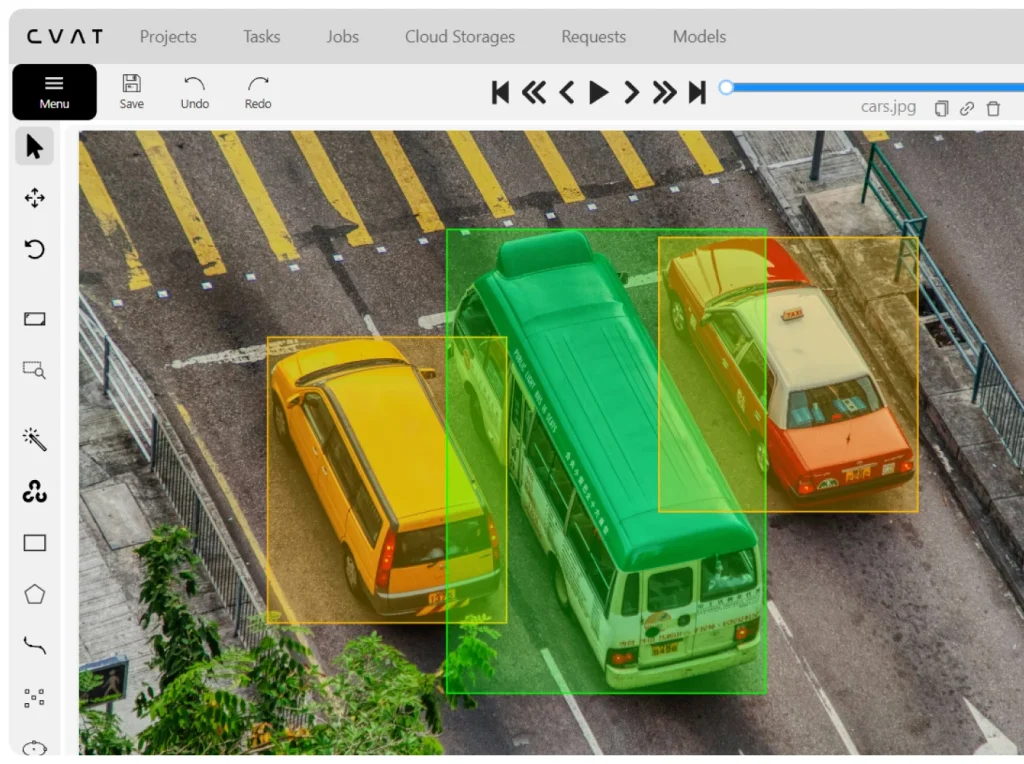
Useful fit: Image and video projects needing boxes, masks, keypoints, object tracking, or 3D annotations. CVAT Community is free and self-hosted, while CVAT Online provides managed hosting. Enterprise adds commercially supported deployment capabilities. The official repository distinguishes Community functionality from advanced analytics, quality-control interfaces, and automation available through paid products.
Edition and trial check: Do not copy a paid-product feature list into a Community evaluation. Test the exact installation, model connection, reviewer process, and export format you would use. For video, correct an object identity after an overlap and inspect the exported sequence. Choose Community when your team can own installation, upgrades, storage, and security—not merely because the license is free.
2. Label Studio: Configurable Text, Audio, and Evaluation Tasks
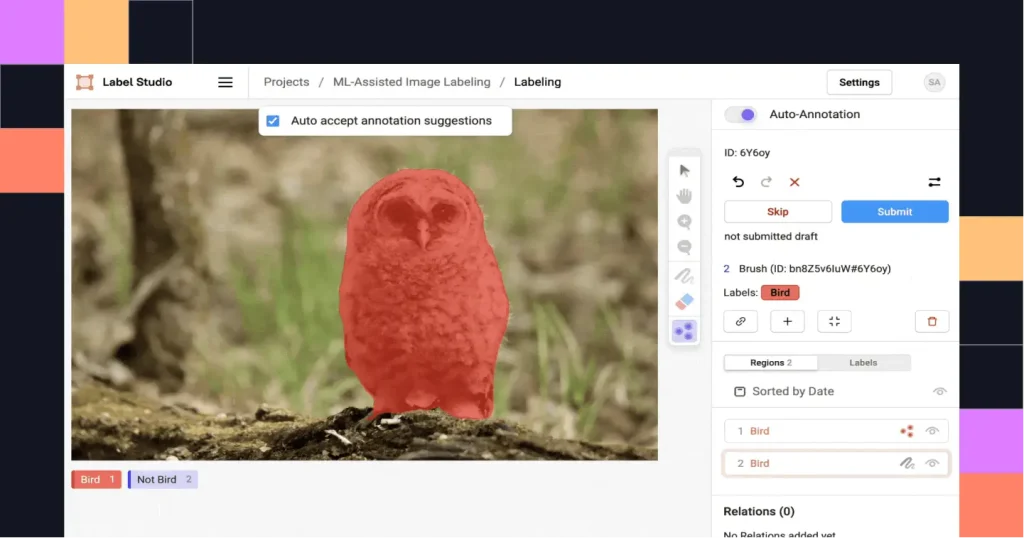
Useful fit: Projects needing tailored interfaces rather than one fixed labeling screen. Its template gallery includes entity recognition, speech transcription, speaker segmentation, classification, and response comparisons. That makes it worth evaluating when several data types or evaluation questions need a consistent project structure. Templates define an interface; they do not replace task instructions or quality review.
Edition and trial check: The edition comparison separates Community from Starter Cloud and Enterprise. Dedicated reviewer assignment is not a Community feature in that comparison; advanced dashboards and activity logs are Enterprise features. For audio, export a corrected transcript with overlapping speakers and inspect timestamps and speaker labels. For evaluation work, verify that the specific template and workflow are included in your edition.
3. Labelbox: Multimodal Annotation and Response Evaluation
Useful fit: Teams combining annotation with evaluation of generated content. Labelbox’s product demonstrations show multimodal chat, speech-to-text, prompt rating, granular fact-checking, and a workflow editor. Its broader product portfolio also covers reinforcement-learning data and evaluation infrastructure. Those offerings should not be treated as interchangeable with a basic annotation-software subscription.
Edition and trial check: Confirm the current package rather than relying on historical Free, Starter, or Enterprise descriptions. Identify which editors, workflow controls, model usage, and workforce services are included. Trial a response-rating task with approved context, separate scoring criteria, and a disputed result. Verify that you can retrieve the source, response, scores, and review decisions in the required output—not only an aggregate rating.
4. SuperAnnotate: Custom Multimodal Forms and Team Workflows
Useful fit: Projects that need reviewers to inspect several inputs and provide structured judgments. Multimodal projects support customizable forms, templates, and workflow selection. The Starter, Pro, and Enterprise plans differentiate orchestration allowances, support, and features such as single sign-on. The relevant question is which configuration fits your production process, not whether the platform has the longest feature list.
Edition and trial check: Test the path from annotation to return, correction, and approval with the intended roles. SuperAnnotate’s May 2026 release notes state that editing a used workflow can update every project using it. Before changing shared configurations, establish a change-control procedure and test on a separate project. Include form-building and integration effort when estimating setup cost.
5. Dataloop: Annotation Within an Automated Data Pipeline
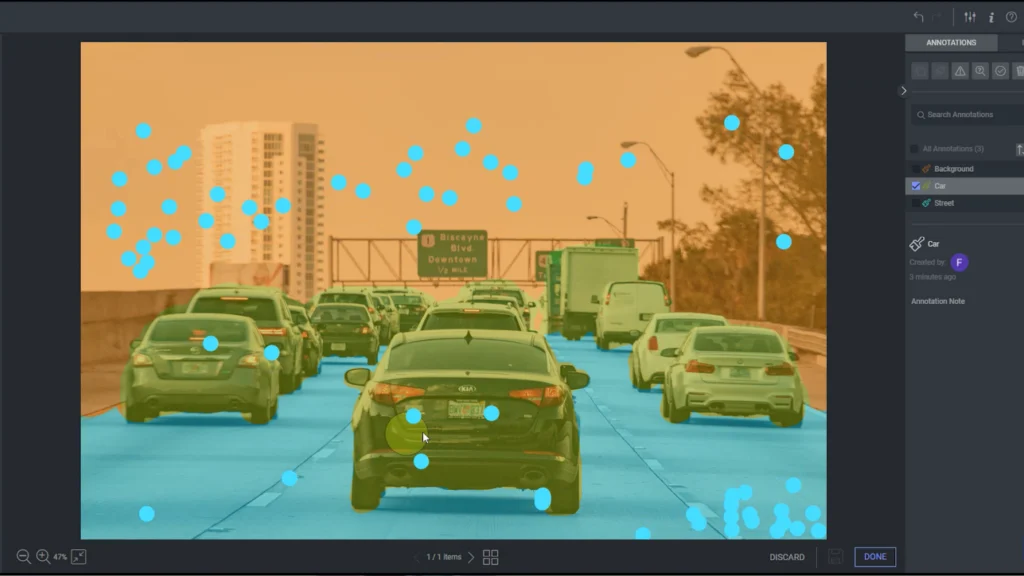
Useful fit: Teams that need data to move between model predictions, human annotation, review, and downstream processing. Dataloop documents separate labeling, review, and consensus nodes, while recipes define task tools, labels, and interfaces. This makes it a candidate for an integrated workflow, rather than simply a replacement drawing interface.
Edition and trial check: For data annotation tools with pipeline features, request a scope covering annotation access, execution, integrations, and the compute configuration you need. Test what happens when an item fails review: it should reach the correct correction queue instead of continuing downstream. Dataloop’s QA dashboard includes correction and approval timing; check whether these measurements can expose bottlenecks in your process. A one-off dataset may not justify extensive pipeline configuration.
6. V7 Darwin: Visual Annotation With Multi-File Context
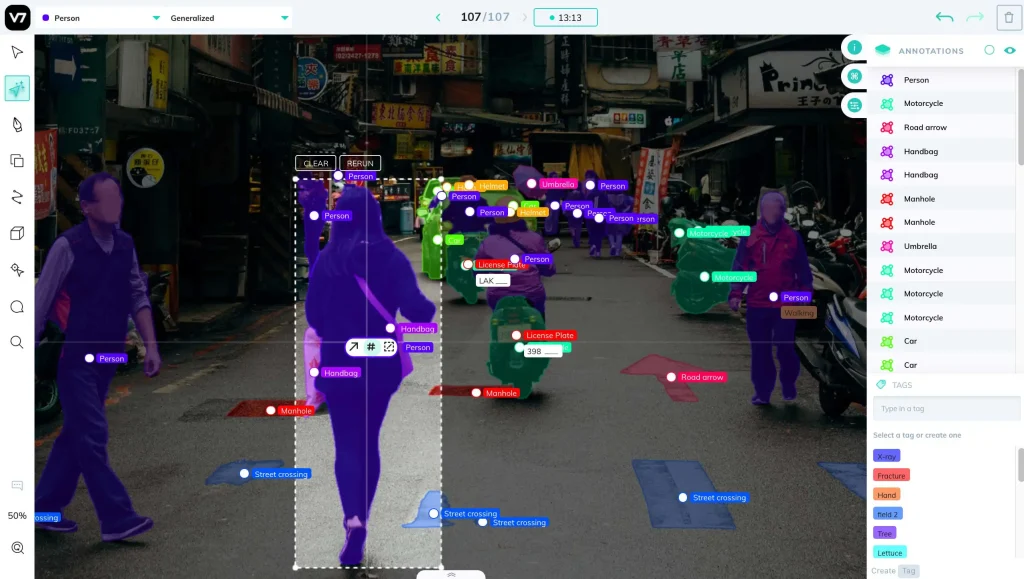
Useful fit: Image and video workflows where annotations depend on visual detail or related reference files. Evaluate V7 Darwin, the labeling product, rather than assuming every V7 product serves the same purpose. Its Slots documentation shows how multiple files can be presented together, such as an image alongside a reference document, with annotations accessible in Darwin JSON.
Edition and trial check: Darwin’s pricing explanation combines platform fees, user licenses, and data-processing charges. Ask how your file sizes, processing volume, and reviewer accounts affect the quote. Trial the files together, correct an annotation, and confirm that export retains the right file association. Treat vendor speed claims as claims to test on your data, not guaranteed project results.
7. Labellerr: Model-Assisted Labeling With Deployment Conditions

Useful fit: Teams assessing pre-labeling, human review, and integration into an existing data environment. Its Enterprise offering describes access controls, storage connections, SDK automation, and workflow integration. The pricing page lists Researcher, Pro, and Enterprise plans, with private-cloud and on-premise deployment identified as an Enterprise add-on rather than a standard feature of every plan.
Edition and trial check: Obtain written limits for your file types, credits, seats, exports, and deployment. Public pricing sections and FAQs contain inconsistent allowances and amounts, so this comparison does not publish a starting price. In the trial, import your own model predictions and deliberately include incorrect labels. Check how reviewers correct them and how those corrections appear in the exported dataset.
8. Appen ADAP: Platform and Contributor Management Together
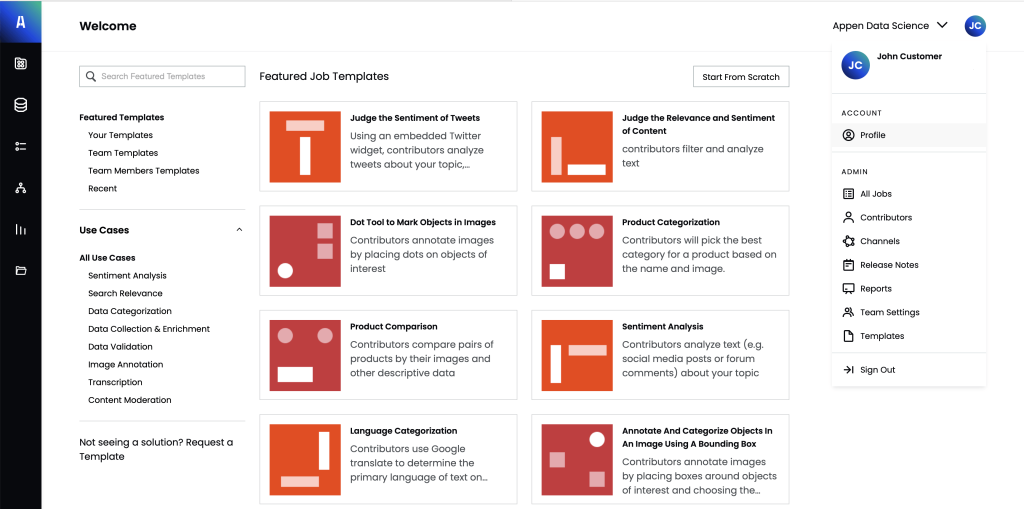
Useful fit: Programs coordinating internal specialists with external annotation contributors. The Appen AI Data Platform, or ADAP, documents multimodal annotation, task routing, multi-stage review, contributor monitoring, and gold test questions. Its relevance is the combination of work execution and workforce management, rather than simply having an image or text editor.
Edition and trial check: Confirm whether the proposed arrangement covers software access, contributor supply, managed delivery, or a combination. Those costs and responsibilities are not equivalent. Test one example with conflicting judgments and examine who resolves it, what evidence is retained, and what the client receives. A team that only needs a small self-managed labeling interface should compare that requirement against the scope being offered.
9. Supervisely: Computer Vision Annotation and Model Workflows
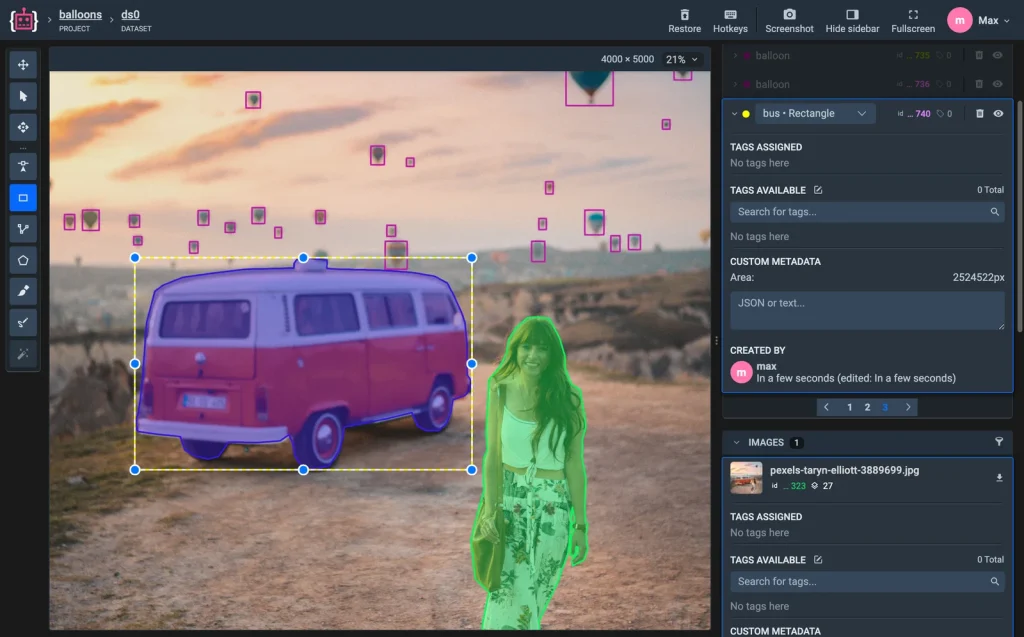
Useful fit: Computer vision teams that want annotation alongside model training, inference, and dataset exploration. Its toolboxes cover images, video, point clouds, and volumetric medical data. The edition matrix distinguishes Community, Pro, and Enterprise, with modality-specific add-ons and different collaboration capabilities. Do not assume its free Community offering is equivalent to an open-source, self-hosted platform. Volumetric CT and MRI projects also need clinical reviewers and DICOM privacy controls, covered in our medical image annotation guide.
Edition and trial check: Self-hosted deployment and certain integrations belong to Enterprise. Check whether your required video, point-cloud, or medical features need an additional package. Trial the full path from model-assisted annotations to review and export; identify any GPU resources your team must supply. When simple tagging is the only requirement, the wider modeling environment may add setup work you do not need.
10. Encord: Video-Native Annotation and Multi-Stage Review
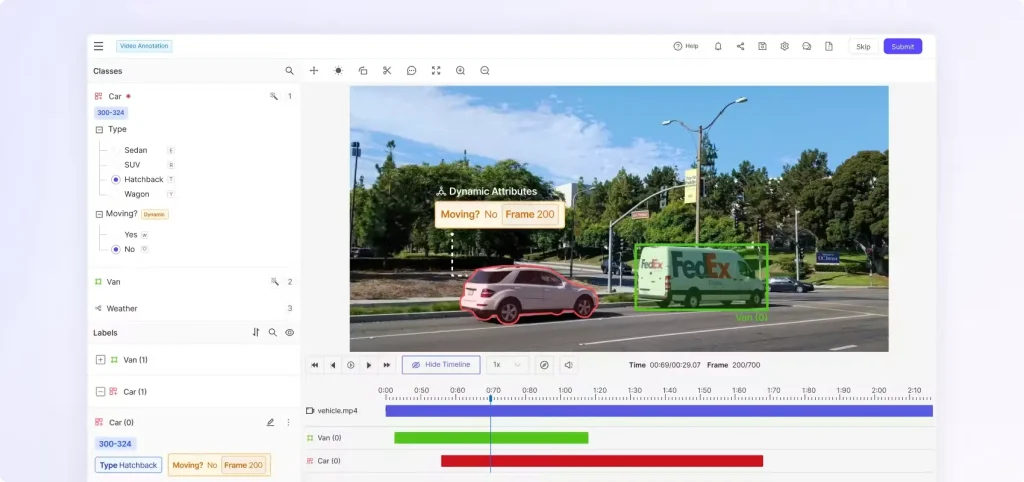
Useful fit: Projects requiring temporal context, nested label structures, and coordinated review. Encord Annotate describes video-native labeling, object tracking, customizable workflows, and support for additional modalities. Its pricing page separates Starter, Team, and Enterprise; Team adds analytics and evaluation capabilities, while Enterprise includes options such as single sign-on and private deployment.
Edition and trial check: Confirm the package for your modality and whether specialist formats, evaluation features, or deployment require add-ons. Use a video with an occlusion, an object leaving the scene, and a similar object entering. Inspect identity continuity after correction and export. A platform-level claim of video support is less useful than proof that the selected workflow preserves the information your model needs.
11. Kili Technology: Task Allocation and Staged Validation
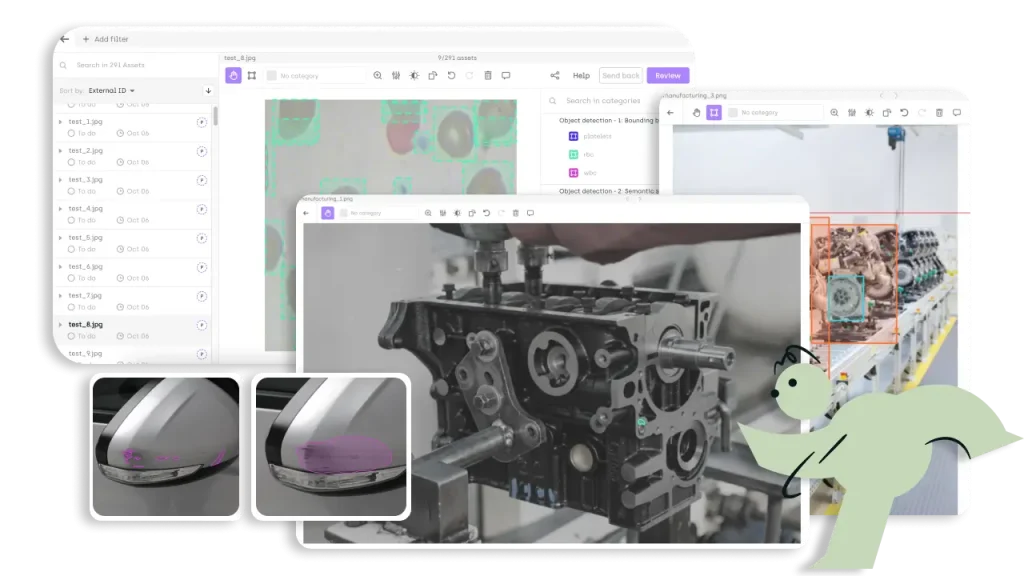
Useful fit: Teams needing controlled work distribution and several levels of review, including expert validation. Kili documents queue prioritization and multi-step workflow configuration. Its pricing page lists Free Trial, Grow, and Enterprise, with on-premise deployment as an Enterprise-only add-on. Product scope should be confirmed against that specific offering rather than generic homepage messaging.
Edition and trial check: Test annotator-to-reviewer routing and verify whether the intended reviewers can return work without losing prior decisions. A one-seat trial is insufficient to validate a multi-role production workflow; request appropriate evaluation access. Also confirm feature status: the separately documented multi-group workflow is in private beta. Do not confuse an accessible standard review workflow with a restricted feature still requiring approval.
12. Segments.ai: Sensor Fusion and Sequence Labeling
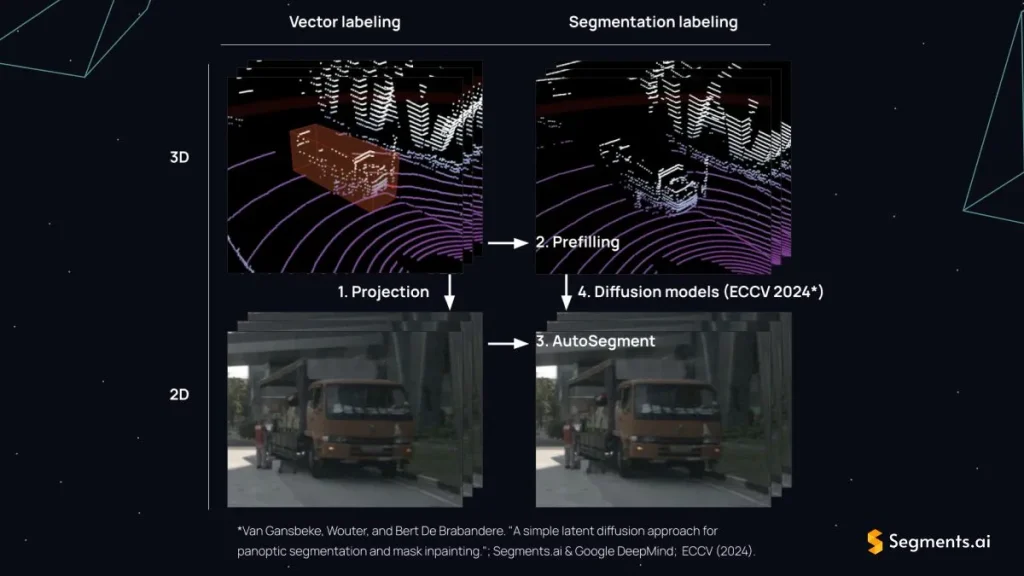
Useful fit: Robotics and other projects combining images, point clouds, and temporal sequences. Its multi-sensor workflow links 3D and image annotations, supports projected cuboids, and maintains track identifiers across modalities and time. This is a more specific requirement than general image classification, so start with the sensor configuration rather than the brand name.
Edition and trial check: The pricing page distinguishes Core for separate sensor data from Fusion for sensor-fusion interfaces; Enterprise adds further customization and security options. Do not assume Core includes the Fusion workflow. Trial your own calibration, timestamps, and object identifiers, then inspect the 3D-to-2D projection and export. A technically valid export can still be unusable if it assumes a different coordinate convention.
For the labeling rules that sensor-fusion projects need beyond the tool itself, see our guide to autonomous vehicle data labeling.
How to Choose Data Annotation Tools for Your Workflow
Match the Output, Not Just the File Type
Choose data annotation tools by asking vendors to demonstrate the required action. For audio, this might mean correcting speaker turns and segment boundaries, not merely uploading a sound file. For text, it may mean overlapping entity spans or linked document fields. For video, it may require persistent object identities. Our guide to data annotation techniques and outputs explains these distinctions before you compare software.
For generative AI, specify whether reviewers must compare responses, score separate criteria, inspect evidence, or evaluate a multi-turn conversation. A text-classification editor does not establish that all those interactions are supported. Label Studio’s evaluation templates illustrate several distinct task designs. Build your trial around the actual interface and output required, not an “LLM-ready” label on a feature page.
Treat Edition and Deployment as Separate Decisions
Record the exact product, plan, add-ons, and version evaluated. Community functionality can differ from hosted or Enterprise functionality even under the same brand. Decide who will run updates, backups, access controls, and integrations. For private deployment, confirm where source data, annotations, logs, and model requests travel; a self-hosted interface alone does not answer every data-flow question.
Compare Total Workflow Cost
Compare data annotation tools using an itemized estimate covering platform access, annotator and reviewer seats, storage, model or compute usage, add-ons, integration, and support. Add internal setup and correction time to your comparison. A low subscription price is not decisive when accepted outputs require manual reconstruction. Keep platform spending separate from the cost of any workforce or managed service included in the proposal.
Test Import, Annotation, Review, and Export Before Committing
Test shortlisted data annotation tools with the same representative sample and instructions. Include routine records, difficult cases, and permitted examples with known errors. Run the trial in the edition you would purchase, with real annotator and reviewer roles. The framework below is a proposed evaluation method, not a claim that Innovature has benchmarked these 12 tools.
| Trial Stage | What to Test | Evidence to Keep |
|---|---|---|
| Import | Files, identifiers, metadata, and pre-existing labels | Missing-record report and mapping checks |
| Annotate | Required shapes, spans, timestamps, or scoring fields | Completed examples and unresolved limitations |
| Review | Rejection, correction, reassignment, and approval | Decision history and corrected records |
| Export | Required labels, identities, timing, and review information | Output files and any custom conversion code |
| Reuse | Load the export into the destination workflow | Successful import plus spot-checked records |
Consider a hypothetical evaluation: Tool A takes 40 minutes to annotate a batch and 35 minutes to correct and export it. Tool B takes 50 minutes to annotate and 10 minutes afterward. If both produce equivalent accepted output, Tool B completes the workflow in 60 minutes versus 75. These are illustrative figures, not product results. The lesson is to measure usable output, not annotation speed alone.
Set non-negotiable requirements before assigning preference scores. A platform that loses mandatory track IDs or cannot enforce required access should not win because its interface is attractive. Document unresolved limitations, needed add-ons, and conversion work. Choose only after the team receiving the dataset confirms it can use the output without unplanned reconstruction.
When Software Selection Is Not the Only Problem
A capable tool still needs clear instructions, trained annotators, and review ownership. If the main constraint is delivery capacity rather than software, our guide to data annotation services covers provider evaluation and project scope. Keep that decision separate from licensing: buying a platform does not automatically supply an operating team.
When you need that team as well, outsourced data annotation teams can add trained labelers and reviewers while you keep ownership of the label definitions.
Innovature BPO provides data annotation and labeling services. To discuss your data types, expected outputs, preferred platform, and review requirements, contact our team. Confirm platform compatibility and delivery responsibilities for the proposed engagement rather than assuming every tool in this comparison is already part of Innovature’s delivery stack.
Frequently Asked Questions
Which Data Annotation Tools Have Open-Source Editions?
CVAT Community and Label Studio Community are open-source options covered here. Evaluate their own feature sets, not the capabilities advertised for commercial editions. Hosting, maintenance, integrations, annotation, and review still require resources even when the software license is free.
Which Platform Should I Shortlist for Audio Annotation?
Start by evaluating the exact task: transcription, speaker segmentation, sound events, or multi-channel review. Label Studio, SuperAnnotate, Kili, Appen ADAP, and Encord document audio-related workflows. Test timestamp editing, overlapping speech, language coverage, and export in the proposed edition before selecting one.
Can AI-Assisted Annotation Remove the Need for Review?
Do not assume it can. Test proposed annotations against approved examples and record both missed errors and correction effort. Decide which outputs need human review, how uncertain cases are handled, and whether apparently confident predictions are checked. Automation speed alone does not establish label quality.
What Is the Most Important Check Before Switching Platforms?
Before switching data annotation tools, test an export from the existing platform and an import into the replacement. Verify label definitions, object identities, timestamps, relationships, and any required review history. Keep a source backup and document fields that need conversion before moving the full dataset.


Data analytics outsourcing with AI can shorten parts of data preparation, query development, and reporting. The value is…

Outsourcing data analytics can add specialist skills, flexible capacity, and more reliable reporting without requiring a business to…

Data Security in Outsourcing: How ISO 27001 Protects Client Data Outsourcing gives external teams access to business processes,…

How to outsource data entry successfully depends less on how quickly a provider can add people and more…

Data Entry Outsourcing: Understanding Cost and Benefits Data entry may look like a straightforward operational task, but its…

Data annotation outsourcing assigns defined labeling and review work to an external team while the client retains responsibility…

A Germany-based logistics provider operating in Vietnam needed a more reliable way to process invoices and related freight…

Logistics data entry outsourcing gives carriers, freight brokers, 3PLs, and other logistics teams external capacity for repetitive shipment-data…

Document processing outsourcing moves repetitive document intake, classification, extraction, validation, exception handling, and system handoff to an external…

Data processing outsourcing for ecommerce assigns defined catalog, marketplace, inventory, order, and record-maintenance tasks to a specialized external…

Logistics analytics outsourcing services help logistics companies turn operational data from TMS, WMS, ERP, carrier, billing, and tracking…

Data annotation in finance turns selected documents, transactions, financial text, and review outcomes into labeled datasets for AI…
Ready to move faster?
Trust us to find the best-fit candidates while you concentrate on building a skilled and diverse remote team.